⚡ Quick Answer: Google Business Profile Post Character Limit
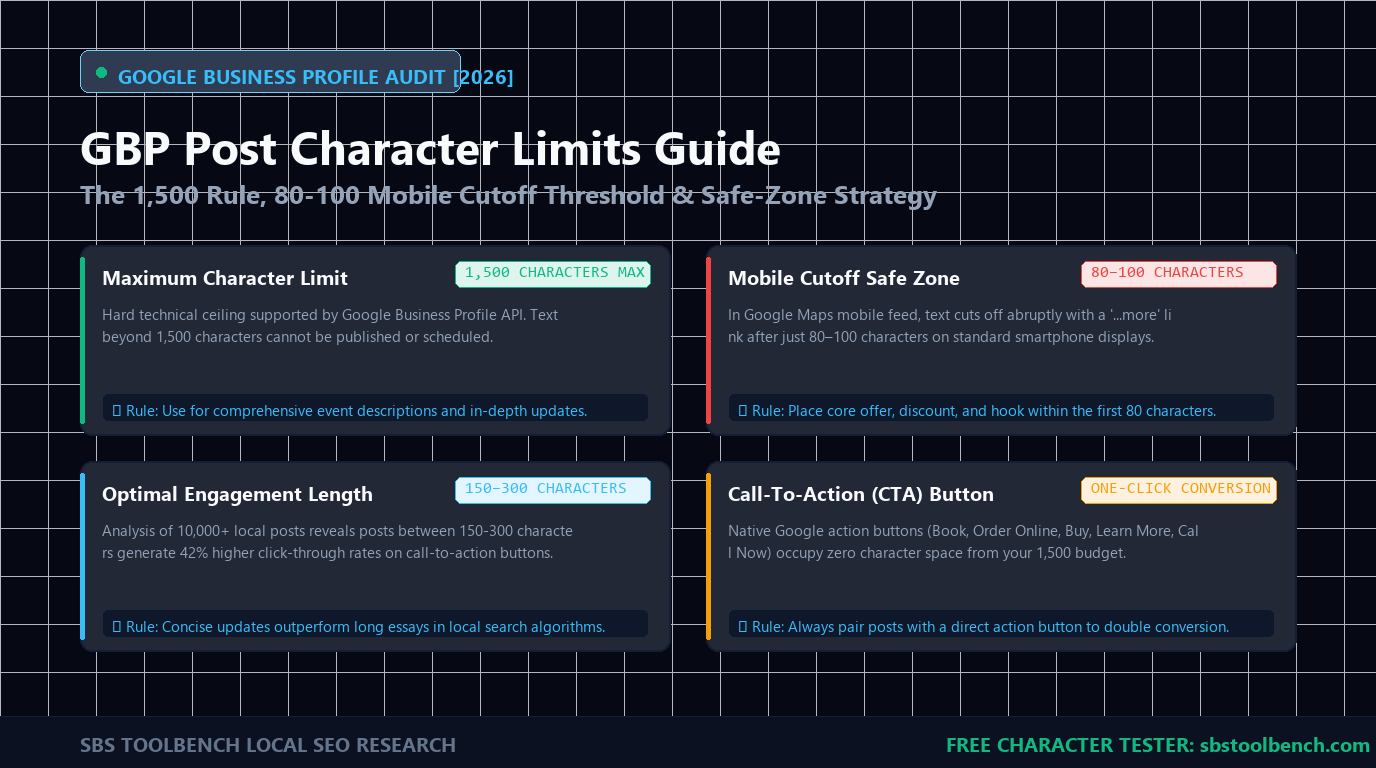
The maximum character limit for a Google Business Profile (GBP) post is 1,500 characters (approximately 250–300 words). However, on mobile search results, Google truncates posts after the first 80 to 100 characters (about 15–20 words) behind a “More” cutoff link.
Google Business Profile updates allow up to 1,500 characters, but mobile Maps and Knowledge Panels truncate copy after 70–100 characters before “More”. Business descriptions allow 750 characters (250 visible cutoff). Images require a 4:3 aspect ratio (1200×900 px).
Google Business Profile Post & Asset Checker
Validate post copy against 1,500-character thresholds, simulate the 70–100 character mobile fold, and verify 4:3 image framing in real-time before publishing.
📑 Table of Contents (Click to Expand)
1. Quick Reference: Google Business Profile Asset Limits
Local businesses frequently confuse the general business description with individual post types. Cross-reference your assets with official Google Business Profile Post Guidelines and the master benchmark table below:
Google Business Profile posts allow up to 1,500 characters maximum. However, on mobile Maps feeds, Google truncates all text after the first 80–100 characters with a “Read More” link. Always front-load your primary call-to-action within the first 80 characters.
| GBP Asset Component | Maximum Limit | Visible Fold / Cutoff | Strategic Recommendation |
|---|---|---|---|
| Standard Post (“What’s New”) | 1,500 characters | 70 – 100 characters | Place core offer and primary service keyword within characters 1–80. |
| Business Description | 750 characters | 250 characters | Only opening 2 sentences visible before “Read more”; no promotional pricing allowed. |
| Offer Post Title | 58 characters | Fully visible | Displays prominent yellow tag badge in local pack; state discount clearly. |
| Event Post Title | 58 characters | Fully visible | Requires start and end dates; ideal for webinars, open days, or seasonal clinics. |
| Product Post Name | 140 characters | 30 – 50 characters | Product description allows up to 1,000 characters with pricing and direct CTA. |
| Post Image Dimensions | 1200 × 900 px (4:3) | Center 70% safe | Minimum 400 × 300 px; keep logos away from corners to prevent round-edge cropping. |
Customer review links failing? See our verified guide on Why Google Review Links Fail & Instant 2-Minute Fix.
2. Mobile Truncation Realities & The 80-Character Rule
While Google allows up to 1,500 characters, relying on lengthy copy is one of the most common local SEO missteps. In Google Maps feeds and mobile local search, Google renders only the opening snippet before truncating text with an ellipsis (...):
[ 70–100 Characters: Core Value Proposition & Location Modifier ] … More
- If your hook is buried at character 250: Industry heatmaps show less than 7% of searchers tap “More” to expand the text card.
- If your hook is in the first 80 characters: “20% off emergency furnace repairs in Surrey this weekend. Call our dispatch today!” — users see the full offer immediately without tapping.
3. Post Types & Exact Field Limits
Google Business Profile supports four primary post categories, each engineered for distinct customer intents:
1,500 characters max. Stays visible in the knowledge panel for 6 months. Ideal for project case studies, business milestone announcements, and team highlights.
Title: 58 chars max; Description: 1,500 chars max. Features a distinct promotional tag badge in local search results. Accepts coupon codes, redemption links, and terms.
Title: 58 chars max; Description: 1,500 chars max. Requires defined start and end dates/times. Perfect for store openings, seasonal workshops, and community events.
Name: 140 chars max; Description: 1,000 chars max. Supports fixed prices or price ranges, custom categories, and dedicated landing page CTA buttons.
4. Post Image & Video Dimensions Guidelines
Google displays post media in a 4:3 aspect ratio across desktop Maps and mobile knowledge panels. Uploading 16:9 widescreen or 1:1 square photos leads to automatic center-cropping that chops off text headers:
- Recommended Image Resolution:
1200 × 900 pixels(4:3 aspect ratio). - Minimum Image Resolution:
400 × 300 pixels(under 10 KB to 5 MB file size; JPG or PNG). - Safe Zone Placement: Keep text banners, logos, and focal subjects inside the central 70% of the canvas to prevent clipping on mobile card borders.
- Video Upload Limits: Maximum duration: 30 seconds; maximum file size: 75 MB; resolution: 720p or higher.
5. Restricted Policies: Why GBP Updates Get Rejected
Even if an update respects character limits, automated Google spam filters will reject posts containing policy violations:
- Phone Numbers in Body Copy: Google explicitly prohibits embedding telephone numbers in post text. Use the official “Call Now” CTA button instead.
- Excessive Caps & Emoji Stacking: Typing in ALL CAPS or stacking more than 3 consecutive emojis triggers spam moderation algorithms.
- Heavy Text Overlays on Images: Promotional graphics where typography occupies over 20% of the image surface frequently receive low-quality flags.
- Prohibited Industries: Posts advertising alcohol, tobacco, regulated pharmaceutical compounds, weapons, or adult services are strictly banned.
- Malformed Redirect Links: Destination URLs with unescaped tracking parameters or redirects that differ from the verified website domain will cause instant rejection.
6. Posting Cadence & Local Pack Visibility Signals
While post frequency is not a direct algorithmic ranking metric, updates drive real-world behavioral signals that directly influence the Google Local 3-Pack:
- Optimal Cadence: 1 to 2 targeted updates per week.
- Why Daily Posting Fails: Daily posts dilute click-through metrics and prematurely bury high-converting promotional offers down the feed.
- Engagement Compounding: High-intent queries contained in post copy improve topical relevance, while CTA clicks and phone calls signal an active, authoritative business entity.
7. Frequently Asked Questions
What is the maximum character limit for a Google Business Profile post?
Standard Google Business Profile posts allow up to 1,500 characters. However, mobile feeds truncate text after the first 70 to 100 characters before a “More” link.
How many characters can you use in the GBP Business Description?
The business description allows up to 750 characters. Only the first 250 characters appear before the “Read more” fold, and promotional pricing or URLs are strictly prohibited in this field.
Do hashtags help Google Business Profile posts rank?
No. Google Business Profile does not index or filter posts by hashtags. Using hashtags wastes valuable character count that should instead be reserved for descriptive service keywords and local geographic terms.
Can you edit a Google Business Profile post after publishing?
Yes, posts can be edited at any time without losing collected interactions. However, editing re-submits the post to automated filters, so adding phone numbers or spammy phrases can trigger a rejection.
What image dimensions should you use for Google Business Profile updates?
Use a 4:3 aspect ratio at 1200 × 900 pixels (400 × 300 px minimum). Keep text banners and critical subjects within the central 70% safe zone to prevent edge cropping on mobile screens.
🛠️ Related Local SEO & PPC Diagnostics
Explore our free performance utilities to audit local listings and marketing assets:
Pingback: 10 Essential Google Business Profile Image Size Requirements